 Skip to main content


Artificial intelligence has completely changed the way people create and edit visual content. From product marketing to social media campaigns and eCommerce listings, AI tools now make it possible to generate professional images faster and more efficiently than traditional photography alone. Whether you are a brand, designer, marketer, or online seller, understanding how to make AI photos can help improve both speed and visual consistency.
Modern tools such as an ai image generator allow users to create realistic visuals without expensive photo shoots, physical prototypes, or time-consuming manual editing. This is especially valuable for industries like furniture, fashion, interior design, and retail, where large numbers of product images are required across multiple platforms.
AI-generated visuals are not just about automation—they are about flexibility. You can create new scenes, improve existing images, generate multiple product variations, and adapt content for different campaigns without starting from scratch.
In this guide, we will explain how to create ai images from photos, how to improve realism, how to edit images using AI, and how to recognize AI-generated content when reviewing digital visuals.
How to Create AI Images From Photos for Faster Content Production
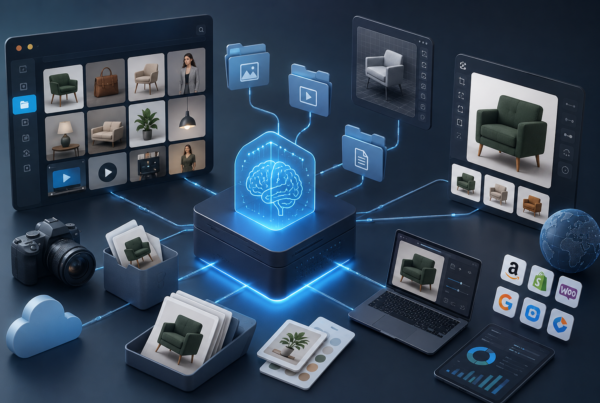
Learning how to create ai images from photos starts with understanding how modern AI systems work. Instead of building visuals manually, AI tools analyze an existing image and use that data to generate new versions, improved scenes, or alternative compositions.
For example, a furniture brand can upload one product photo and create multiple lifestyle scenes showing the same chair in different rooms, lighting conditions, or seasonal campaigns. Fashion brands can generate multiple styling variations without repeating expensive studio sessions.
This process is especially useful for businesses with large product catalogs because it supports scalable visual production while maintaining consistent brand presentation.
To create effective AI visuals from existing photos, it is important to begin with high-quality source material. Clear lighting, strong angles, and clean composition improve how the AI interprets the original asset. Once uploaded, the tool can generate new backgrounds, perspectives, colors, and even completely new environments.
This makes AI image generation a major advantage for eCommerce teams that need fast updates across websites, marketplaces, and paid advertising channels.
How to Make Realistic AI Photos That Look Professional
Many users ask how to make realistic ai photos because realism is what separates useful business content from obvious low-quality AI output. Strong AI visuals should feel natural, detailed, and believable rather than artificial or overly polished.
Realism starts with context. Lighting must match the scene, shadows should behave naturally, and textures need to reflect real-world materials accurately. A sofa rendered for an interior design campaign, for example, should show correct fabric texture, proportion, and interaction with surrounding light.
Perspective is equally important. AI images often fail when proportions look unnatural or product placement feels visually incorrect. High-quality tools solve this by using structured rendering logic rather than simple visual approximation.
Using advanced rendering systems helps improve this significantly. In product marketing, 3D rendering supported by AI allows brands to generate visuals that look like professional photography while remaining fully editable.
Businesses using AI for product visualization often rely on this method to create consistent product images across large catalogs. This improves both conversion potential and customer trust because the visuals look polished and reliable.
Understanding how to make realistic ai photos means focusing on accuracy, not just aesthetics.
How to Edit Photos With AI for Better Marketing Results
Knowing how to edit photos with ai helps businesses save time while improving image quality across all sales channels. Instead of manually adjusting every asset in traditional editing software, AI tools can automate many of the most important tasks.
This includes background replacement, lighting correction, shadow refinement, color adjustments, object cleanup, and image expansion for multiple formats. A single product image can be optimized for a website banner, marketplace listing, Instagram campaign, and print material without repeating the full production process.
For example, a product originally photographed on a white background can be transformed into multiple styled scenes for seasonal promotions. This reduces the need for repeated studio work and helps teams launch campaigns faster.
AI editing also improves consistency. Large brands often struggle with product visuals created across different teams, locations, or suppliers. AI helps standardize presentation so all assets match the same visual language.
This is especially valuable when using an ai image generator for product visualization because the goal is not only speed, but also maintaining trust through consistent professional presentation.
Understanding how to edit photos with ai allows marketing teams to scale content production without sacrificing visual quality.
How to Identify AI Generated Photos in Digital Content
As AI visuals become more common, many people want to understand how to identify ai generated photos. This matters not only for authenticity, but also for quality control in marketing, publishing, and customer-facing content.
Some AI-generated images are obvious because they contain visual mistakes—strange hands, inconsistent shadows, distorted reflections, or unrealistic textures. However, advanced rendering tools now produce visuals that are much harder to distinguish from traditional photography.
In product visualization, the goal is often not to hide AI usage, but to create high-quality visuals that accurately represent the product. In these cases, realism is a business advantage rather than a concern.
Still, marketers should review generated images carefully. Product proportions, dimensions, color accuracy, and functional details must remain correct. A visually attractive image that misrepresents the real product can damage trust and increase return rates.
Metadata analysis, visual consistency checks, and rendering quality reviews all help determine whether an image was AI-generated. For brands, the focus should be less on detection and more on responsible use—ensuring that AI improves clarity rather than creating misleading visuals.
Understanding how to identify ai generated photos helps businesses use the technology strategically instead of blindly following trends.
Why AI Image Creation Is a Competitive Advantage
The question is no longer whether businesses should use AI visuals, but how effectively they can integrate them into daily workflows. Brands that understand how to make ai photos gain significant advantages in speed, flexibility, and cost efficiency.
Instead of waiting for product samples, booking expensive shoots, and repeating manual edits, companies can create high-quality content at scale. This is especially valuable for product-heavy industries where fast launches and visual consistency directly affect revenue.
AI-based visualization supports faster time-to-market, stronger brand control, and more efficient campaign production. It also allows teams to test new concepts quickly, generate localized content for multiple markets, and adapt product visuals for seasonal campaigns without rebuilding the entire process.
For modern eCommerce and product marketing, AI is no longer an experimental tool—it is becoming the standard.Learning how to make ai photos, how to improve realism, and how to manage AI-generated content responsibly gives businesses a strong competitive edge. With the right tools and strategy, AI visuals become more than a shortcut—they become a core part of scalable, high-performance digital marketing.